
Cross-border sellers, listen up. Choosing the wrong AI model isn’t a minor misstep—it’s the difference between winning and being left in the dust. This isn’t about casually trying ChatGPT or Gemini. After investing heavily in testing nearly every major paid LLM, the verdict is clear: for cross-border e-commerce professionals, going “All in Claude” delivers the highest ROI.
A bit exaggerated? Just for a tool, is it worth it?
Indeed, from a pure tool perspective, it might not warrant such a strong “all in” recommendation. But the AI era is not child’s play; it’s a new revolution teeming with massive opportunities. From that angle, it’s at least worth your serious consideration.
You might think, “AI tools? ChatGPT works, Gemini works, isn’t it fine to just use whatever?” No. The cost of choosing the wrong AI tool isn’t just a slight difference—it’s “not even in the same league.”
I have spend about $1,000 a month on AI tools, having paid to try almost all the mainstream large language models. After using them all, there’s only one conclusion: For cross-border sellers, going “All in Claude” is currently the choice with the highest return on investment.
Why? Let me share my perspective below.
Why You Must “All In”
Many people think there’s no harm in trying multiple tools. But I’m telling you, the cost of fragmented learning is much higher than you imagine.
You learn to write prompts on ChatGPT, but those skills might not transfer well to Claude. You fine-tune a workflow on Gemini, and it could be useless on another model. So, every time you switch tools, you have to relearn its quirks, its limits, and its best practices. Do that three times, and you’ve spent triple the time, becoming only superficially familiar with each.
So, what’s the effect of going “All in” on one good AI tool?
First: A Real-World Example
When I used Claude, it took me only 1.5 days to go from learning it to building a complete workflow. From zero to a full pipeline for competitor monitoring, automated listing generation, and ad analysis on N8N—done in 1.5 days. I grasped OpenClaw in half a day, and not only understood it, but I could also guide thousands of people through it. Sure, I have my own learning methodology, but Claude played a huge role in this.
Second: This Company is Setting Industry Standards
MCP, the Skill system, Computer Use, super-long context, Projects for memory—these concepts were pioneered by Anthropic (Claude’s creator), with others following suit. When an AI company consistently defines the names and standards for the industry, it means two things: 1) Their technical foundation is genuinely deep, and 2) These people truly think things through before launching products; they’re not just chasing trends.
When you’re building workflows and learning a system, choose the one that’s the most powerful and is setting the standards. Others will end up compatible with it, ensuring your investment doesn’t go to waste. This is why I, advise cross-border sellers to all in on it. If you’re going to build a workflow and learn a system, pick the most capable one, and it’s worth spending your money on.
What Can Claude Do for Cross-Border Business?
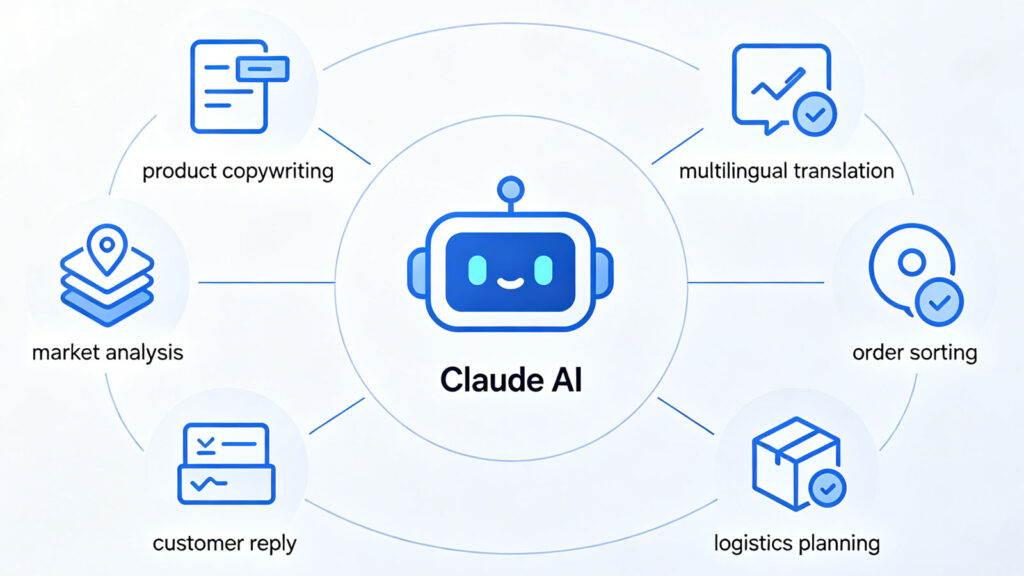
The workflows I’ve built previously, such as:
- Analyzing competitor pricing, sales volume, inventory, and review monitoring
- Writing listing copy
- Conducting competitor analysis
- Creating graphics
- Performing ad and inventory analysis
- Deconstructing viral videos
- Monitoring and analyzing YouTube and TikTok viral trends
All of these were completed using Claude + N8N. You just need to provide specific requirements and goals, and it helps you achieve them.
Many are still researching RPA, N8N, Dify, or learning specific skills the hard way. That’s just too slow now. With a key large model, the core issue becomes: How deep is your understanding of the business, and can you articulate it clearly? If you don’t understand the business, the output will be garbage. If you can’t express yourself clearly, even the best tool will just lead you in circles. So, you need to be strong yourself, and then choosing a powerful AI model will save you a lot of detours.
About Account Bans
When talking about Claude, the issue of account bans must be addressed. You’ve probably seen many articles about it, and they all boil down to a few key points:
- IP Address: Use a stable node/server. Don’t jump from the US to Japan one day and somewhere else the next. Accounts are very sensitive to this.
- Device, Payment, and Browser Environment: Logging in from multiple locations simultaneously significantly increases the risk of triggering fraud detection.
- Don’t Go Too Hard Too Fast with New Accounts: Intensive usage immediately after registration can easily trigger anomaly detection. Take it slow, let the account have a “warm-up” period.
- Control CLI Call Frequency: Don’t send dozens of concurrent requests at once.
Let’s be frank, there’s no 100% foolproof solution to bans, but following the above minimizes the risk considerably. Claude’s company doesn’t just ban Chinese users; international users get hit just as easily. Just this morning, I saw a company CEO complaining on X that Claude inexplicably banned over 60 of their company’s accounts.
I myself had a 2-year-old account banned for no apparent reason when I tried to upgrade to Max 20. Switching to other large models afterward was a real “you don’t know what you’ve got until it’s gone” moment. Although I later registered for Claude again, I’m now walking on multiple legs. Here’s my current approach:
First, Claude API (Apply Separately)
You can apply for the Claude API separately; it’s unrelated to having a standard account. This hasn’t been banned since I applied. The downside is it’s expensive—tokens get consumed fast, and without control, money just flows out. I use it for running decision-making processes, batch data processing, and automated workflows. I use it when quality is critical, so I choose this model for those tasks.
Second, Google Antigravity
It comes with Claude Opus integrated. The advantage is it’s integrated into the dev environment, ready to use anytime. The downside is that if you use Claude Opus, credits deplete quickly, and you have to wait for a reset. I calculated you can use it about three times a day with a 4-hour interval. It’s suitable for complex reasoning tasks and key decision-making discussions. If you use Gemini 3.1 Pro, that’s unlimited use, and running multiple agents is very convenient.
Third, Coding Plan (Less than $30/month)
I now use a Claude shell with the models built into Coding Plan, which costs less than $30 per month. I can switch between 8 different models in the terminal anytime, like glm5.1, kimi2.5, minimax2.5. It’s very convenient. This solution doesn’t consume official Claude credits and is reasonably priced, good enough for daily text work.
Finally, it’s only through extensive use that you can compare. If Anthropic goes public, I’m definitely buying its stock. Let’s see if it can list as planned this October. Only by using it deeply and having comparisons can you dare to make a heavy bet.