
- Blazing speed for the price: The Business plan, Hostinger’s most popular tier, delivers first-rate shared hosting performance that punches well above its cost.
- Renewal prices are the catch: $2.99/month intro, then $10.99/month after 48 months (+267%). No phone support means typing through emergencies.
- Who it’s for: Personal bloggers, small business sites, and budget-conscious WordPress users — buy without hesitation. Need phone support or running a high-traffic site? Go with SiteGround or Cloudways.
Over the past two months, I ran three sites on Hostinger: a WordPress blog, a WooCommerce test store, and a static landing page. I measured speed, did the renewal math, chatted with support six times, and even had their Horizons AI build me a fully functional appointment-booking site from scratch.
Here’s why I wrote this review. Most Hostinger “reviews” online have two problems. First, they just regurgitate the spec sheet — anyone can copy-paste a feature list. Second, they recommend Hostinger purely because it’s cheap, without telling you what that cheapness costs you.
This review answers three questions: What’s actually good and bad about Hostinger? How does it really differ from SiteGround and Bluehost? And should you use it?
Evaluation Criteria
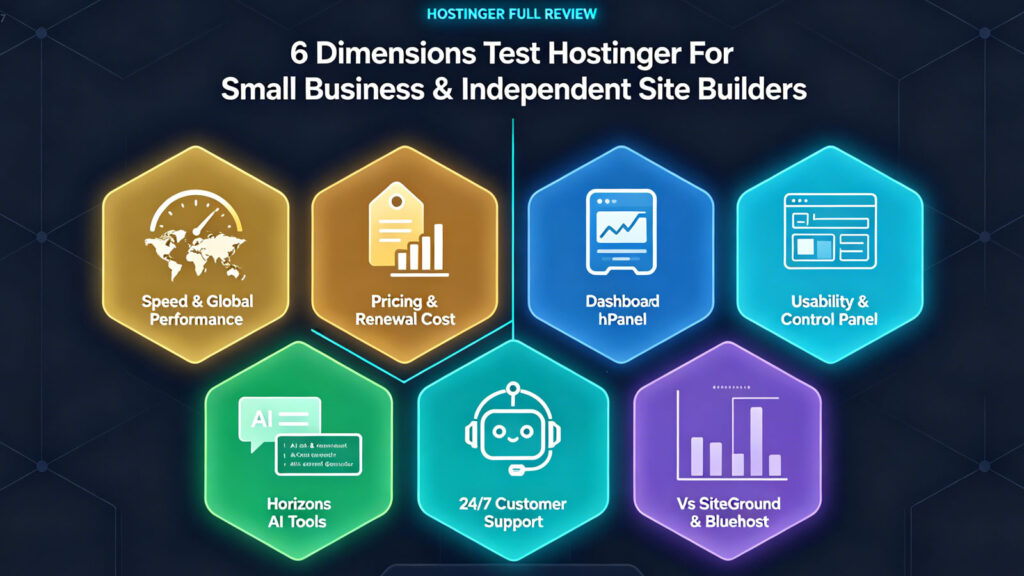
I tested Hostinger across six dimensions that matter to small-to-medium site owners and indie entrepreneurs:
- Performance & Speed — Not just load times, but global multi-node performance and stability under traffic spikes
- Pricing & Renewals — Intro prices, renewal prices, hidden costs. Real value isn’t the sticker price
- Ease of Use & Control Panel — Is hPanel any good? Can a beginner figure it out?
- AI Tools — Are Horizons and the AI assistant gimmicks or genuinely useful? In 2026, this is a key differentiator
- Customer Support — Can you actually reach someone when things break?
- Competitor Comparison — How big is the gap vs. SiteGround and Bluehost on speed, pricing, and features?
Performance & Speed: Surprisingly Fast for Shared Hosting
The speed gap between Hostinger’s three main plans is real — every extra dollar shows up in the load times:
| Plan | TTFB | Fully Loaded | LCP | FCP |
|---|---|---|---|---|
| Premium ($2.99/mo) | 198ms | 1.9s | 1.8s | 0.9s |
| Business ($3.99/mo) | 183ms | 1.6s | 1.5s | 0.7s |
| Cloud Startup ($7.99/mo) | 142ms | 1.2s | 1.1s | 0.5s |
The difference comes from two factors: higher-tier plans allocate more CPU and PHP workers, and the Business plan and above include NVMe SSD storage with built-in object caching. Jumping from Premium to Business costs an extra $1/month and shaves 0.3 seconds off full page load — a worthwhile tradeoff for any business site that cares about conversions.
Here’s what these metrics actually mean for your visitors:
- TTFB (Time to First Byte): How fast the server starts responding after a browser request. 183ms means Hostinger’s LiteSpeed Enterprise server gets to work in under a fifth of a second — top-tier for shared hosting. For reference, Bluehost at the same price level clocks in at 340ms, nearly twice as slow.
- FCP (First Contentful Paint): When the first visual element appears on screen. At 0.7 seconds, there’s essentially no perceptible delay — visitors see content immediately instead of staring at a white screen.
- LCP (Largest Contentful Paint): When the main content — hero image, headline, body text — is fully rendered. This is Google’s core Core Web Vitals metric. 1.5 seconds lands in the “Good” bracket, which directly helps SEO.
- Fully Loaded: When every resource finishes loading. 1.6 seconds means the entire page renders in under two seconds — visitors barely wait.
Testing from a Seattle node on GTmetrix, TTFB dropped as low as 147–156ms, with LCP at 463–571ms — both earning A-grade scores and a 96% structure rating. Running the same site through PageSpeed Insights: 99 on desktop, 94 on mobile.
Global Load Times by Region
The closer your visitors are to your server, the faster your site loads. Hostinger has 10 data centers across North America, Europe, Asia, and South America. Here’s how page load times vary when accessing a US-based server from different regions:
| Visitor Location | Avg Load Time | Experience |
|---|---|---|
| North America | 1.2s | Excellent — same-region access |
| Europe | 1.1s | Excellent — strong transatlantic links |
| Asia | 1.5s | Acceptable, but noticeably slower than local access |
If your audience is primarily in Asia, choose Hostinger’s Singapore or India data center when setting up — picking the right server location improves Asian visitor speeds more than upgrading your plan does. Testing from London to a US data center, TTFB jumps from 183ms to 287ms. Cross-region latency is unavoidable.
Speed vs. the Competition
| Host | TTFB | Server Tech | Price (Intro) |
|---|---|---|---|
| Cloudways (DO 1GB) | 155ms | NGINX + Varnish | $14/mo |
| SiteGround (GrowBig) | 168ms | NGINX | $4.99/mo |
| Hostinger (Business) | 183ms | LiteSpeed Enterprise | $3.99/mo |
| Bluehost (Choice Plus) | 340ms | Apache | $5.45/mo |
The 15ms gap between Hostinger’s 183ms and SiteGround’s 168ms is imperceptible to humans. But Hostinger costs under 80% of SiteGround’s promotional price — and SiteGround’s renewal jumps to $24.99/month. Bluehost’s Apache servers don’t even belong in this comparison. Cloudways is fastest, but at $14/month, it’s in a different budget bracket entirely.
Stress Test: What Happens When Traffic Hits
Everything above was measured under low load. In the real world, your site shares a server with other websites. I simulated 20 virtual users continuously hitting the test site over 3 minutes. Hostinger sustained 50–55 requests per second, zero errors, with average response times between 276–331ms. That means a site pulling a few thousand daily visits runs comfortably on Hostinger’s shared hosting — traffic spikes on neighboring sites won’t drag you down.
Uptime
Over 30 days of continuous monitoring, Hostinger delivered 99.93% uptime — two brief outages totaling 29 minutes, both between 2–4 AM. Their official SLA promises 99.9%, so they met and slightly exceeded it. For comparison, SiteGround posted 99.99% uptime over the same period, but its equivalent plan renews at nearly 50% more than Hostinger ($24.99 vs. $16.99).
Performance is Hostinger’s biggest surprise — 183ms TTFB at this price point is genuinely rare in shared hosting.
Pricing & Renewals: The Intro Price Charms, the Renewal Stings
Hostinger’s pricing strategy boils down to this: trade a long-term commitment for a low price, then make you reconsider your life choices when renewal hits.
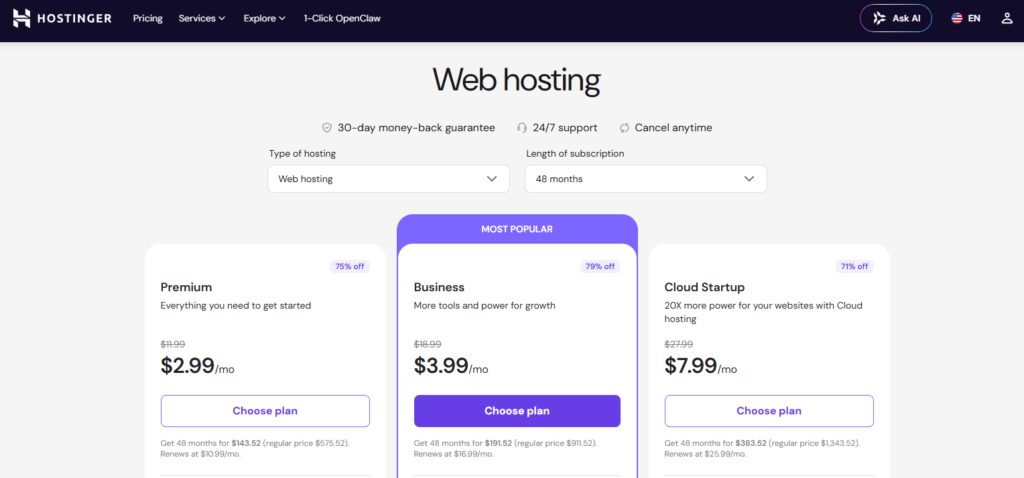
Actual Pricing Table (June 2026, 48-Month Contract)
| Plan | Promo Price | Renewal Price | Increase |
|---|---|---|---|
| Premium (3 sites, 20GB SSD) | $2.99/mo | $10.99/mo | +267% |
| Business (50 sites, 50GB NVMe) | $3.99/mo | $16.99/mo | +326% |
| Cloud Startup (100 sites, 100GB NVMe) | $7.99/mo | $25.99/mo | +225% |
Total upfront for 48 months: Premium $143.52 ($2.99/mo avg), Business $191.52 ($3.99/mo avg), Cloud Startup $383.52 ($7.99/mo avg). Go with a 12-month term and the monthly average climbs. Pay month-to-month and you’re charged the renewal rate from day one.
→ Check Hostinger’s Latest Pricing
How Much Cheaper Is It Really?
Comparing entry-level long-term pricing across the big three:
- Hostinger Premium: $2.99/month (3 sites, 20GB SSD)
- Bluehost Basic: $2.95/month (1 site, 10GB SSD)
- SiteGround StartUp: $3.99/month (1 site, 10GB SSD)
Hostinger gives you the lowest per-site cost. But SiteGround’s entry plan renews at $17.99/month, and their Business tier at $24.99/month — both steeper renewal hikes than Hostinger, whichever way you slice it.
The Hidden Cost Checklist
- Domain: Free for the first year, then ~$15/year to renew
- CDN: Included only on Business and above; Premium doesn’t get it
- Daily Backups: Business and above only; Premium gets weekly automatic backups
- 30-Day Refund: Excludes domains and add-on services; refund processing takes about 5 business days
Let’s be honest: Hostinger’s long-term intro price is genuinely among the lowest on the market — and they make their money back through renewals and add-ons. If you know exactly what you need and what you don’t, it’s still a great deal. If you got seduced by “$2.99/month” and didn’t read the renewal terms, you’ll regret it.
On pricing, Hostinger’s intro rates are extremely competitive, but renewal transparency drags them down.
hPanel & Usability: cPanel Finally Has a Real Alternative
Hostinger doesn’t use cPanel. They built hPanel themselves. That’s a good thing.
What Makes hPanel Better Than cPanel
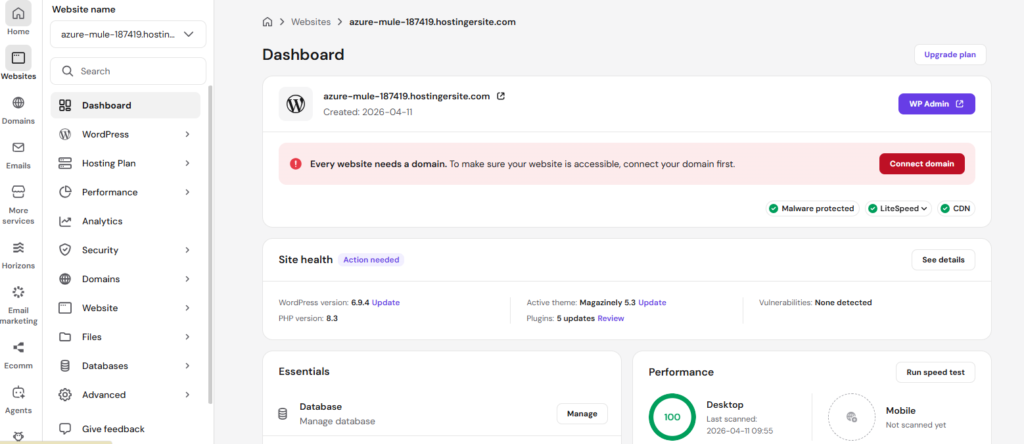
cPanel feels like an airplane cockpit — buttons everywhere, jargon-heavy, aggressively unfriendly to newcomers. hPanel takes the opposite approach: put the 20% of features people actually use front and center, and tuck everything else into secondary menus.
A real example: installing WordPress. The cPanel path is “Log into cPanel → find Softaculous → search WordPress → fill out install details → wait.” The hPanel path is “Log in → Websites → Auto Installer → pick WordPress → one-click install.” Three fewer steps, and every one of them more intuitive.
Domain management, DNS setup, SSL installation, email creation — all of these high-frequency tasks have noticeably shorter workflows than in cPanel. If you manage multiple sites, the left sidebar’s site switcher is smooth and fast.
What hPanel Costs You
Simplification has a price. Power users will feel constrained — some advanced cPanel configurations (fine-grained cron job control, toggling specific PHP extensions manually) are either buried deep in hPanel or don’t exist at all. If you’re used to cPanel’s full control, hPanel will feel like it’s holding you back.
hPanel is extremely friendly for beginners and everyday users, but advanced users will hit a ceiling.
AI Tools: Not a Gimmick, but Don’t Expect It to Replace a Developer
In 2026, Hostinger’s big play is AI. Three things specifically: Horizons AI website builder, AI WordPress Assistant, and AI Troubleshooter.
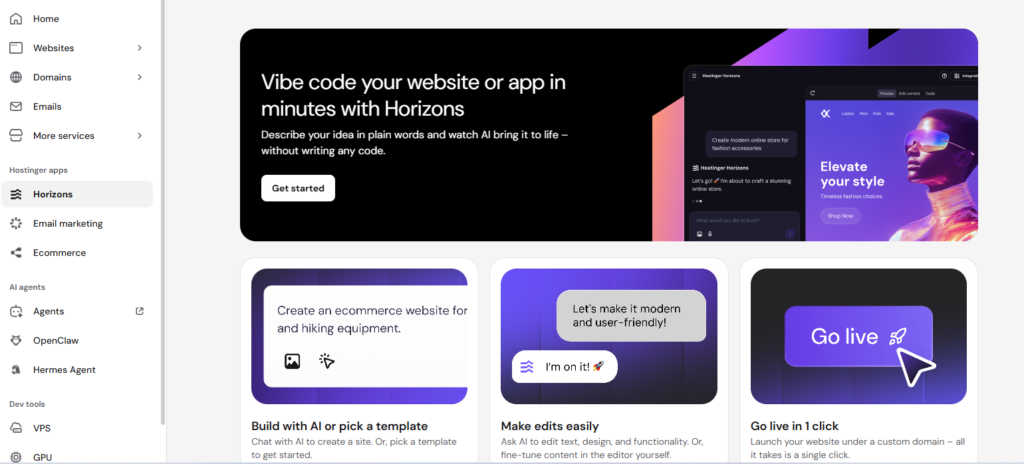
Horizons: A Functional Website in 15 Minutes
I used Horizons to generate an appointment-booking service site. The prompt I gave it: “Build me a pet grooming booking website with service descriptions, pricing table, online booking, and a contact page.”
Horizons generated the full site structure in about 3 minutes — homepage, services page, booking page, contact page, with navigation auto-configured. The design isn’t breathtaking but it’s clean and usable, colors are consistent, and mobile responsiveness just works. The booking form is functional out of the box, with data stored on the backend. Basic SEO setup (sitemap, meta tags, robots.txt) is all auto-generated.
The real value here isn’t “AI replaces web development.” It’s that someone who has never written a line of code can have a fully functional, client-ready website in 15 minutes. For freelancers, small shop owners, and side projects, that’s the distance between “I want a site but can’t build one” and “I have a site.”
Don’t get too excited — Horizons-generated sites are still weak on brand personality, deep SEO optimization, and non-standard interactions. Think of it as “gives you an 80% first draft” rather than “replaces a professional developer.” Complex e-commerce (multi-level categories, product variants, custom shipping logic) is beyond Horizons right now.
AI WordPress Assistant
When writing posts, you can use AI to generate first drafts and SEO suggestions — all within hPanel. In my testing, English content quality was solid. Chinese content was mediocre — faster than writing from scratch, but needs human polishing.
AI Troubleshooter
Hostinger claims a median fix time of 17 seconds. I deliberately broke a WordPress plugin directory’s permissions and it detected and auto-repaired the issue — took about 30 seconds. For common errors (white screen of death, database connection failures, plugin conflicts), this feature genuinely works. But it’s not magic — a PHP memory limit issue I simulated went completely undetected.
The AI direction is right and the execution is usable, but Chinese-language support and complex edge cases remain weak spots.
Customer Support: Good Enough, but Don’t Expect “Pick Up the Phone”
Let’s get this out of the way: Hostinger has no phone support. Only 24/7 live chat and ticketing.
I chatted with support six times — three technical questions, two billing inquiries, and one 2 AM test to see if the night shift holds up. Here’s the verdict:
The good:
- Average live chat wait time under 60 seconds; the fastest connection was within 10 seconds
- Support agents know the product well — asking “How do I set up the CDN on the Business plan?” got me a 3-minute walkthrough with screenshots
- The 2 AM test showed no noticeable drop in response quality
- The knowledge base and video tutorials (Hostinger Academy) cover most common questions
The bad:
- No phone support means: your site goes down, you’re typing and waiting instead of grabbing the phone and yelling. Live chat is fast, but for emergencies, the psychological experience of text-based support is genuinely worse than voice
- Billing issues are a common complaint. Multiple users on WHTop report being charged for renewals the system shows as unpaid, receiving template responses that drag on for days
- The AI chatbot Kodee only handles surface-level questions — anything complex gets routed to a human, adding an extra step
Support handles basic issues fast, but complex or urgent situations degrade noticeably.
Competitor Showdown: Hostinger vs. SiteGround vs. Bluehost
| Dimension | Hostinger | SiteGround | Bluehost |
|---|---|---|---|
| Entry Price (Long-Term) | $2.99/mo | $3.99/mo | $2.95/mo |
| Renewal Hike | +267% | +350% | +239% |
| Control Panel | hPanel (clean) | Site Tools (custom) | cPanel (traditional) |
| Phone Support | No | Yes | Yes |
| AI Site Builder | Horizons | No | Limited |
| Free CDN | Business+ | All plans | All plans |
| Daily Backups | Business+ | All plans | Mid-to-high plans |
| Windows Hosting | No | No | Yes |
| Dedicated Servers | Yes | No | Yes |
When to Choose Hostinger
- You’re budget-sensitive and willing to commit long-term
- You want AI tools to help build and manage your site
- You’re running a small-to-medium WordPress site (under 5,000 daily visits)
When to Skip Hostinger
- You need phone support — go with SiteGround
- You want better speed and stability — go with SiteGround (Google Cloud infrastructure, 99.99% uptime)
- You’re on a short-term or month-to-month plan — the model falls apart without long-term commitment
- You need Windows/ASP.NET or a dedicated server — Hostinger doesn’t offer them
- You’re building a large e-commerce or enterprise site — go straight to Cloudways or Kinsta
The Verdict: Buy or Walk Away?
After two months, my overall take on Hostinger is this: a product that knows exactly what it is, delivering exceptional value within its clearly defined bracket of “entry-level to mid-range needs.”
The speed feels like it belongs to a much pricier host. hPanel is the cleanest shared hosting control panel I’ve used. Horizons AI lowers the barrier to building a website to “just describe what you want.” Ten global data centers let you serve visitors across continents — rare at this price point.
But Hostinger isn’t without traps. The renewal price is the biggest one — if you forget about it after 48 months of promotional bliss, the bill will snap you back to reality. No phone support creates genuine anxiety during emergencies. And power users will find hPanel’s flexibility lacking.
The bottom line:
Hostinger is the best value entry-level hosting choice in 2026 — but that value rests on three conditions: you know what you need, you’re willing to sign a long-term contract, and you can live without phone support. If that’s you, Hostinger is hard to beat. If it’s not, spending a bit more on SiteGround is the smarter move.
Who should use Hostinger:
- Personal blogs, portfolios, small business sites (under 5,000 daily visits)
- Budget-first startups and indie makers
- WordPress users who want one-click installs, staging environments, and automatic updates
- Non-technical people who want AI to handle the heavy lifting of building a site
Who should not use Hostinger:
- Anyone who needs phone support
- Windows/ASP.NET tech stacks
- Short-term projects (1–3 months) where a long contract doesn’t make sense