
Tools age. Features change. But good mental models do not depreciate. This final chapter steps back from keystrokes and commands to address a few things that matter more than any specific feature.
The Three-Layer Model: Where to Spend Your Time
Every Claude Code capability fits into one of three layers:
Prompt layer: every sentence you type in the terminal. “Add a login page.” “Fix this bug.” Most beginners operate entirely at this layer. It works, but every interaction requires you to speak, and every interaction starts from zero.
Context layer: everything Claude already sees before you say a word. Your CLAUDE.md files, the project file structure, Git commit history, the dependency list in package.json. This information does not need to be repeated — Claude reads it automatically. The entire chapter on CLAUDE.md is fundamentally about optimizing this layer.
Harness layer: the automation environment you build. Skills package reusable workflows into invocable commands. Hooks trigger actions automatically at key events. MCP connects external services. Agent Teams let multiple Claude instances collaborate in parallel. This layer has one defining characteristic: once built, it keeps working without you needing to trigger it manually.
An analogy: the Prompt layer is you speaking. The Context layer is the slides you prepared in advance. The Harness layer is the entire stage you built. The audience’s (Claude’s) performance depends on the combined quality of all three.
| Layer | Investment | Return Profile |
|---|---|---|
| Prompt | Reinvested every conversation | One-time returns |
| Context | Write CLAUDE.md once, it persists | Compound returns |
| Harness | Build automation once, it runs forever | Exponential returns |
Beginners pour all their energy into the Prompt layer — refining wording, studying prompt techniques. This is not wrong, but the ceiling is low. Expert users push information down into the Context layer and delegate repetitive work to the Harness layer, reserving the Prompt layer only for decisions that genuinely require real-time judgment.
If you take one thing from this entire book, take this: spend your time building Context and Harness, not optimizing Prompts.
Under the Hood of Claude Code
After using Claude Code for a while, have you ever wondered what actually happens when you press Enter?
Understanding the internals is not about taking the black box apart for sport. It is about knowing why Claude sometimes “takes the long way around,” why /compact occasionally loses details, and why Auto Mode passes some operations and blocks others. These are not random behaviors — they follow clear design logic.
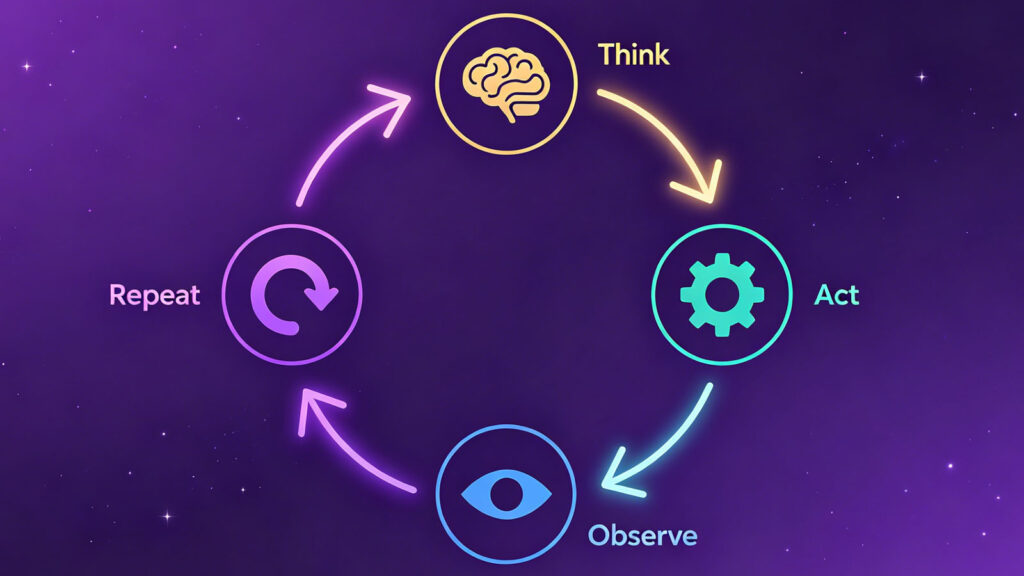
The core loop: Think → Act → Observe → Repeat. Claude Code runs on an agent loop called TAOR. When you input a task, Claude does not generate a block of code in one shot and hand it to you. It thinks about the current state and decides what to do next. It calls a tool to execute an action — read a file, run a command. It observes the result and judges whether the task is complete. If not, it loops back to Think. This cycle can spin dozens of times before stopping.
This explains why Claude sometimes seems to wander. It is not a straight line from input to output. It is a continuous cycle of probing and adjusting. Every step, it makes a new decision based on new observations. Sometimes it tries one approach, finds it does not work, backs up, and tries another. This is not a bug — it is the design.
It also explains why giving Claude clear verification criteria matters so much. The loop needs a stopping condition. If your requirements are vague, Claude does not know when it is “done” and will keep looping, changing things endlessly. Tell it “stop when the tests pass” or “just generate the file,” and it converges much faster.
The tech stack: React in your terminal. An interesting fact: the Claude Code interface you see in the terminal is rendered with React components. Claude Code runs on Bun rather than Node.js, uses React’s Ink framework for terminal UI rendering, is written entirely in strict-mode TypeScript, and uses Zod for schema validation. The entry file compresses to 785KB — substantial for a terminal tool, but reflective of its feature density.
Why does this matter? It explains Claude Code’s rich interaction experience. Permission confirmation dialogs, multi-line code highlighting, progress indicators — these are hard to achieve in traditional terminal tools but natural with React’s component model. The feeling of smoothness is not an illusion. It is an engineering choice.
40+ tools, 4 primitive capabilities. Claude Code has over 40 internal tools, each with independent permission controls. But step back, and all capabilities reduce to four primitives:
| Primitive | What It Does | Typical Tools |
|---|---|---|
| Read | Read files, read code, search content | Read, Grep, Glob |
| Write | Write files, edit code | Write, Edit |
| Execute | Run commands, execute scripts | Bash |
| Connect | Connect to external services | MCP tools, WebFetch |
The key insight is the Bash tool. It is a universal adapter — any command-line tool a human developer can use, Claude can use. No dedicated integration needed for each programming language, no plugin required for each framework. npm install, python test.py, git push — all accessible through Execute + Bash. This is why Claude Code works in virtually any tech stack, unlike IDE plugins that only support specific languages.
Context compression: why long conversations “forget.” You have probably experienced this: after a long conversation, Claude suddenly forgets a requirement you mentioned earlier. Or after running /compact, certain details become fuzzy. This is not Claude being lazy.
When the context window nears capacity, the system compresses the entire conversation history into a summary. That summary becomes the starting point for the next round; the original verbatim conversation is discarded. Compression is lossy. Core information survives, but specific phrasing, edge details, and the implicit tone of your requests easily vanish.
Worse: in long sessions with multiple compressions, information loss accumulates. Each compression drops a little more. After several rounds, your earliest context may be reduced to a faint shadow.
Practical takeaway: write important constraints and requirements into CLAUDE.md, do not only mention them in conversation. Conversations get compressed; CLAUDE.md gets re-read every session. This reinforces the three-layer model’s conclusion: push information into the Context layer.
The permission system: more than yes/no. Auto Mode is not a simple allow-all switch. Under the hood, a classifier rates every operation as LOW, MEDIUM, or HIGH risk. Reading a file is typically LOW — auto-approved. Writing a config file is MEDIUM or HIGH — requires confirmation. Certain files are hardcoded as protected: .gitconfig, .bashrc, .zshrc — these system-level configs get extra caution regardless of permission mode. There is even path-traversal defense to prevent malicious code from using Unicode characters or case-confusion tricks to bypass permission checks.
One detail worth noting: the explanation text you see on every permission prompt is not a preset template. It is generated in real time by a separate LLM call. That is why the phrasing varies slightly each time — it is not instability, it is the design.
Automatic memory maintenance. Claude Code has a background sub-agent that periodically tidies up your memory files. It works in four steps: review existing content, extract new useful information, merge duplicate entries, and trim overlong sections. The goal is to keep memory within a reasonable size — about 200 lines.
This is why, after using Claude Code for a while, it feels like it increasingly “gets you.” It is not solely that the model is getting smarter. Your preferences, habits, and project context are being gradually accumulated and maintained by this memory system.
Understanding these internals is not about dismantling the black box. It is about collaborating better. When you know how the loop spins, how context compresses, and how permissions are judged, you make better choices about how to work with Claude.
The Shifting Identity: From Coder to Product Builder
This change is happening faster than most people expect.
Boris Cherny, the creator of Claude Code, has publicly stated that over 90% of his code is now generated by Claude Code. His day-to-day is describing requirements, reviewing output, and making architecture decisions. His own words: “My job now is more like a product manager with technical judgment.”
The key capabilities are shifting. Declining in importance: syntax fluency, framework API memorization, manual debugging skills, code template accumulation. Rising in importance: requirements decomposition, architecture judgment, output quality review, product taste.
I say “declining,” not “disappearing.” Understanding code still has value — it helps you describe requirements better and review output more accurately. But you no longer need to be able to write a complete application from scratch. You need to be able to judge whether an application is well-written.
The core question shifts from “how to write it” to “what to write.”
Before, you might have spent 80% of your time on “how do I implement this feature” and 20% on “what features should exist.” Now the ratio is inverted. Claude Code solves the “how to write it” problem. The “what to write” problem — that is still yours. You need to decide: What problem does this product solve? Who is the target user? What is the core experience? Which features are essential, and which can be cut?
If you are anxious about whether AI will replace you, reframe the question: learn to define requirements, design interactions, and review quality. These capabilities will not lose value as AI grows stronger.
How to Keep Up With the Pace
Claude Code’s feature velocity is relentless. MCP protocol release. Public beta launch. GA with major stability improvements. SubAgents. Hooks. Skills. Agent Teams. Computer Use and Voice Mode. Source code accidentally leaked, giving the community its first full look at an agent system’s architecture.
On average, a major feature every two months. Some specific steps in this book may need updating within three months.
How do you keep up? Stable information sources: the official Claude Code changelog for detailed update notes, the Anthropic blog for major feature launches with deep-dive articles, and Anthropic Academy with over a dozen free courses from fundamentals to advanced. For the creators’ perspective: Boris Cherny’s X account (@bcherny) for tips and design thinking, howborisusesclaudecode.com for official practice guides, and the “How Anthropic Teams Use Claude Code” whitepaper for real internal workflows. For design philosophy: Boris’s appearances on Lenny’s Podcast, Pragmatic Engineer, and YC Lightcone.
Do not try to track every minor update. Spend your time building things with the tool, not studying the tool itself. Thirty minutes browsing the changelog once a month is enough.
What you should actually pay attention to is not specific feature changes but direction. Three threads have remained consistent across the past year and a half of evolution: autonomy keeps increasing — from needing step-by-step instructions to autonomous planning and execution; context windows keep expanding — from 8K to 200K to 1M, and Claude can “see” larger and larger projects; collaboration modes keep diversifying — from single agent to SubAgents to Agent Teams, multi-agent collaboration grows more natural.
This means the skill you are learning — “how to collaborate with AI” — will not become obsolete. Specific commands may change, but the core loop of “describe requirements → review output → iterate and improve” will hold for the foreseeable future.
Recommended Resources
If you want to go deeper after this book:
Essential:
- Claude Code Best Practices — the authoritative source for all techniques, regularly updated
- DeepLearning.AI x Anthropic course series — structured learning from Andrew Ng’s team and Anthropic
- Anthropic Academy — over a dozen free courses from Prompt Engineering to Agent Development
- “How Anthropic Teams Use Claude Code” whitepaper — real internal workflows, not theory
Advanced:
awesome-claude-codeGitHub repo — community-curated plugins, skills, and best practices- Claude Code Ultimate Guide — community documentation covering edge cases official docs miss
howborisusesclaudecode.com— Boris’s complete workflow, continuously updated- Boris on Lenny’s Podcast — a deep conversation on “what happens after coding is solved”
- Boris on Pragmatic Engineer — the evolution from side project to core tool
Closing
Writing this book, I kept returning to one question: what is the endgame for AI programming?
I thought about it for a long time and did not arrive at a clean answer. But one thing I am fairly sure of: over the past year and a half, I have built over a dozen products with Claude Code — iOS apps, Chrome extensions, PDF generation tools. The final quality of every single product was determined not by the upper limit of AI’s capabilities, but by my own judgment of what “good” means.
AI can write a login page in 30 seconds. But whether a login page is needed at all, what the user should see after logging in, what experience feels smooth — only a human can judge these things.
So my advice is one line: do not spend too much time studying the tool. Go build things. Find a problem you genuinely want to solve, open a terminal, and start talking to Claude. When you get stuck, flip through this book, then keep going.
The distance from idea to product is now shorter than you are probably ready for.